
Name check
Which registered marks resemble your name.
List the names you are considering and describe the product. The search runs on your computer, in a local copy of the US and French trademark registers. The report lists the registered marks that resemble each name, and why, with questions to take to a trademark professional.
- Searched on your computer
- US + FR registers; EU not searched
- About 10 to 15 minutes
How it goes
Searched on your computer; the report written on the checked machine.
- 1
List your names and describe the product
One matter holds the names you are considering and a short description of what you sell. The assistant proposes the trademark classes that fit; you confirm them.
- 2
The search runs on your computer
The app keeps a local copy of the registers (a one-time download of about 250 MB, about 800 MB on disk). Each search takes seconds and runs on your computer: a name is never sent to a trademark register, a search engine or a website.
- 3
The assistant writes the report
It reads your notes and the search results and writes the report. It runs on the sealed machine the app checks first, so it does see your names and product description. The whole check takes about 10 to 15 minutes.
Matching
Five ways a mark can resemble a name.
Same spelling
The name as written, ignoring case and accents.
Sounds alike
English and French phonetics, so Kwik finds QUICK.
Spelled closely
A small spelling difference away.
Contains, or is contained in
Your name inside a longer mark, or a mark inside your name.
Shares a word
A word in common with a multi-word mark.
Every mark says why
Each listed mark carries the reason it was listed, so you can take it to a professional.
The report
What you get.
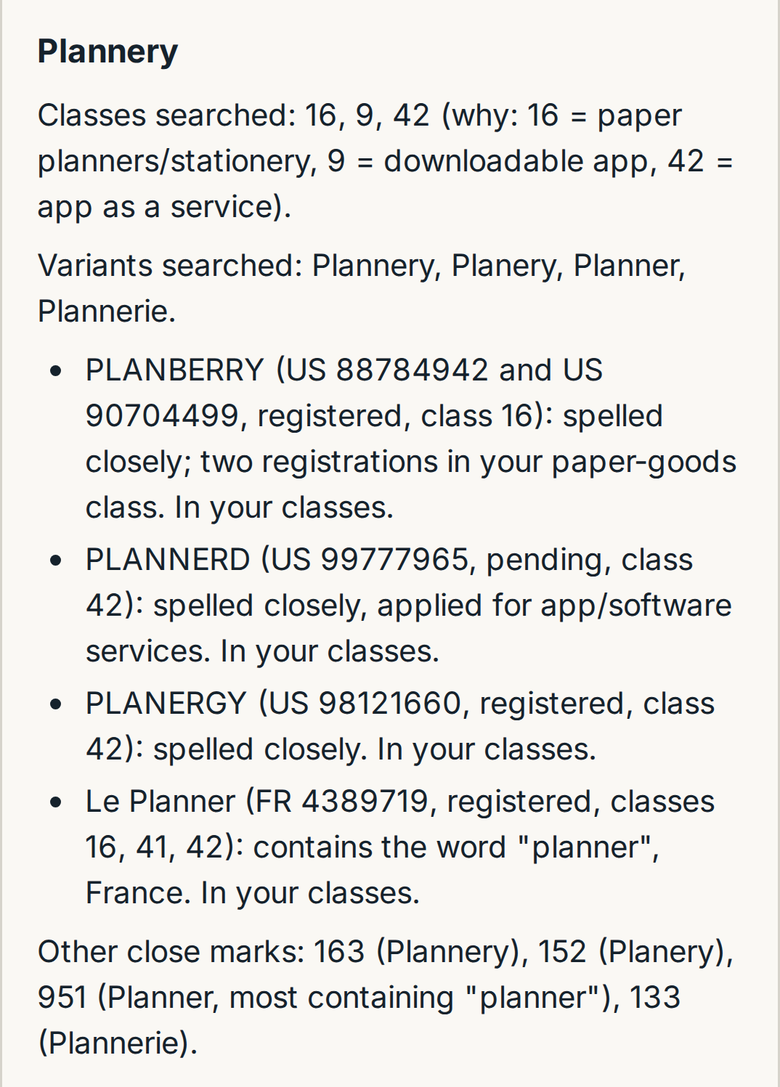
- The classes chosen and why (you confirm them)
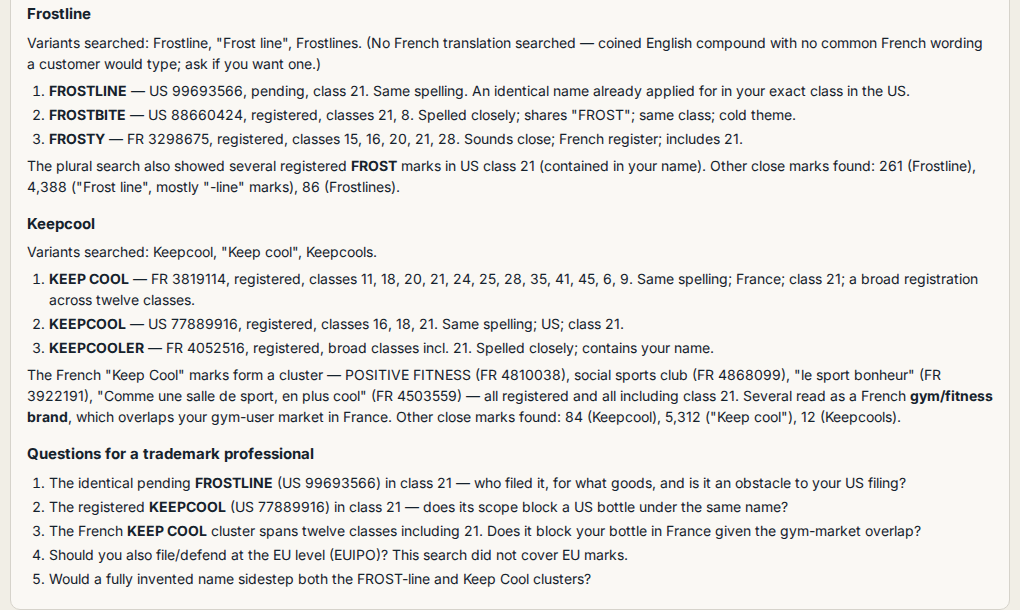
- The variants searched for each name
- Up to three closest marks per name: register, number, status, classes, and the reason
- A count of other close marks
- Questions for a trademark professional
The matter page lists every search in full, straight from the search on your computer.
What it never says
Not a legal opinion.
- It never says a name is free to use, low risk, or can be registered.
- It does not judge whether two marks would be confused; that is a legal judgement.
- It does not show who owns a mark or what goods it covers: the local data has classes only.
- The assistant may remark on what a mark's wording suggests; that is a reading of the name, not register data.
Not legal advice. Take the report to a trademark attorney before you launch.
Coverage
What it searches, stated plainly.
Searched
- USPTO (United States): live word marks, data to 30 September 2026, including the 212,789 international (Madrid) registrations designating the US
- INPI (France): live word marks, French national filings only, data to 16 October 2026
Not searched
- EU trade marks (EUIPO)
- International registrations designating France or the EU (WIPO Madrid)
- Other countries
- Company and trading names, domain names, unregistered use
- Logo-only marks; expired or dead marks
On our own test set of 52 known conflicts, every one appeared in the top 20 results. The set is small and we built it ourselves; it is not a measure of what the check finds in the real world.
Start
Three steps, about five minutes.
- 1
Create your account
Your first name check is free. Your account gives you an app key.
- 2
Install the app
One command on macOS (Apple silicon) or Ubuntu.
- 3
Open a matter
An invention, a document or repository to read, or names to check.